

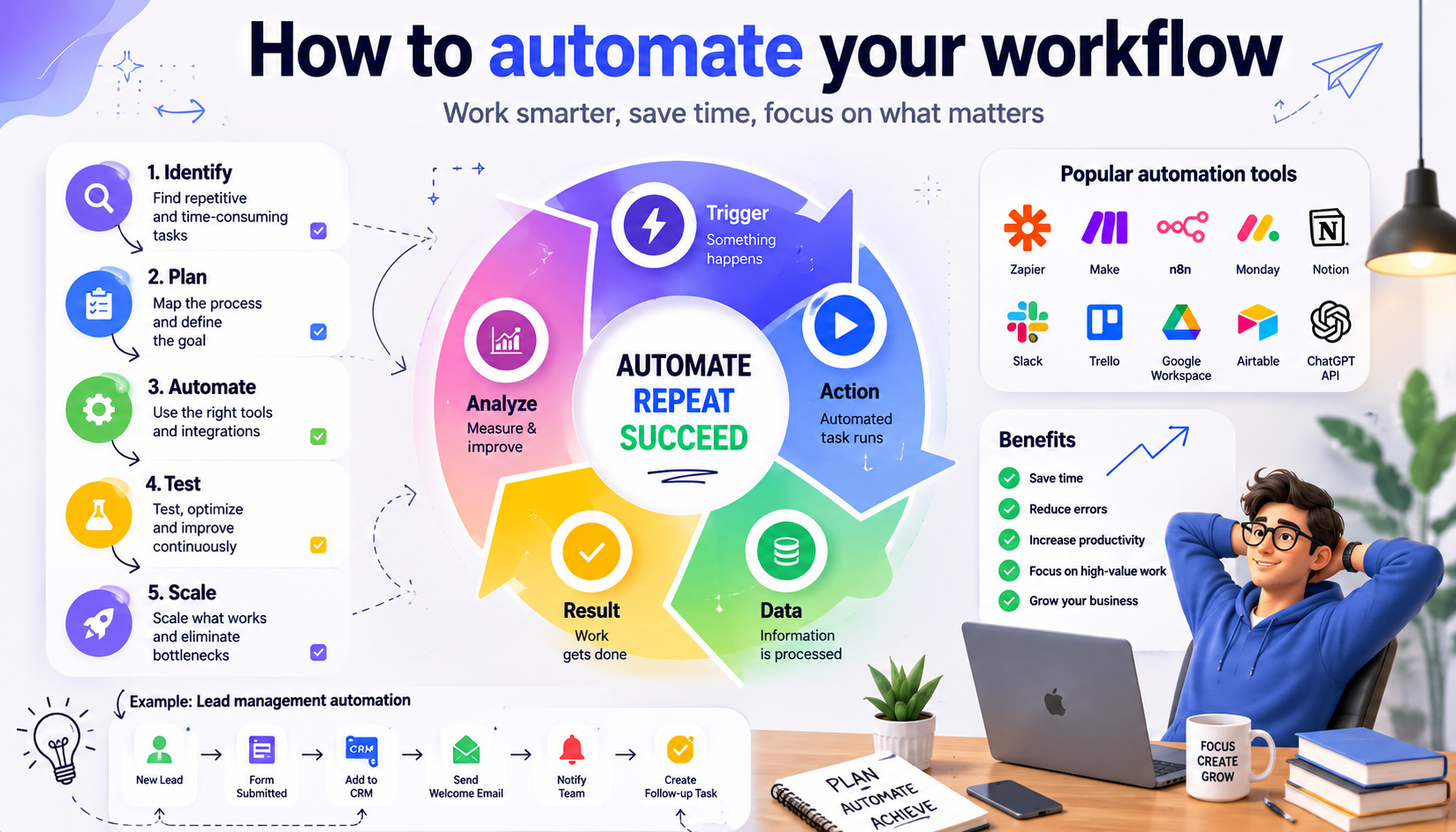
Most workflow automation guides tell you to “identify repetitive tasks” and “choose the right tool.”
Thanks. Very helpful.
Here’s the version that actually gets you from zero to a working automated workflow — without spending three weeks configuring something that saves you four minutes a month.
The One Question That Matters Before You Start
Not “what can I automate?” That question produces a wishlist.
The right question: what task do I do most often that follows the same steps every time?
Most people have two or three of these. A daily report that requires pulling data from the same places. An intake process where new requests get logged, assigned, and acknowledged. A content publishing process with the same checklist every time. A client onboarding flow that involves the same emails and same document requests.
Pick one. The most frequent one. That’s where you start.
Not the most impressive one. Not the most complex one. The most frequent one — because frequency is where the time savings actually compound.
Map It Before You Build It
Before opening any automation tool, write out every step of the workflow you’re automating.
Not in a flowchart. Just a numbered list. Step one, step two, step three. Every action, every decision point, every person or system involved.
This takes fifteen minutes. It saves hours of rebuilding when you discover halfway through that you missed a step or misunderstood the process.
The list also reveals something important: which steps actually need automation and which ones need a human. Not everything in the workflow should be automated. The goal is to remove the mechanical steps — data entry, routing, notifications, format conversion — and keep the humans on the steps that require judgment.
If a step in your list is “someone decides whether to approve this” — that stays with a human. If a step is “send a confirmation email with the details from the form” — that’s automation.
Choosing the Tool
Short version: start with the simplest tool that handles your specific workflow.
For most people building their first automation, that means one of three options:
Zapier — if you need two apps to talk to each other and you want it working in an hour. Limited logic, high reliability, easiest setup. Good for: trigger in one app, action in another.
Make (formerly Integromat) — if your workflow has multiple steps, some branching logic, and you want to see it visually. Better for complex flows than Zapier. Takes longer to learn.
n8n — if you’re technical, want full control, and need self-hosting for data privacy reasons. The most powerful of the three. The steepest learning curve. The most flexible.
The best workflow automation tools in 2026 goes deeper on this — but the decision tree is simple. Start with Zapier for simple flows. Graduate to Make when you need more. Consider n8n when you need control or privacy.
Don’t switch tools mid-project. Pick one, build with it, learn its limits before moving on.
Building Your First Automation: A Real Example
Let’s make this concrete.
The workflow: A new client inquiry comes in through a website form. Currently: someone checks the inbox, copies the details into a CRM, creates a task for follow-up, and sends an acknowledgment email. Takes about ten minutes per inquiry.
The automated version:
- Form submission triggers the automation
- Contact is created or updated in the CRM automatically
- Task is created and assigned to the right person
- Acknowledgment email is sent from a template with the inquiry details filled in
- Slack notification goes to the team channel
Total human time: zero. The ten minutes is now available for the follow-up itself.
What stays human: The actual follow-up call or email. The decision about how to respond. The judgment about whether this is a good fit.
This is a one-hour build in Zapier or Make. For a business receiving even five inquiries a week, that’s fifty minutes recovered per week. Over a year, that’s forty hours.
The Steps Most People Skip
Error Handling
What happens when the automation fails?
This isn’t hypothetical. Automations fail. APIs go down. Data arrives in unexpected formats. Required fields are missing. If you haven’t planned for failures, you’ll discover them when a client doesn’t get their acknowledgment email and nobody knows why.
Every automation needs a failure path. At minimum: an email or Slack notification when something breaks. Ideally: a fallback that routes the failed item to a human for manual handling.
Build the error handling before you go live. Not after.
Testing With Real Data
Test with actual data from your real workflow — not made-up test data.
Real data reveals edge cases that test data doesn’t. A name with an apostrophe. A phone number in an unexpected format. A form field that sometimes gets left blank. These are the things that break automations in production and feel fine in testing.
Run at least five real examples through the automation before relying on it.
Documentation
Write down what the automation does, what it connects to, and what to check first when it breaks.
This takes twenty minutes. It saves enormous pain when you come back to it six months later — or when someone else has to touch it.
Adding AI to Your Workflow
This is where 2026 is different from 2023.
AI steps are now standard in most workflow automation platforms. An AI step can classify an incoming request, summarize a document, draft a response, extract structured data from unstructured text, or make a routing decision based on content rather than a rigid rule.
The practical additions that add real value:
Email triage: AI classifies incoming emails by type and urgency, routes to the right person or queue automatically.
Document extraction: AI pulls specific information from PDFs, invoices, contracts — structured output from unstructured input.
Draft generation: AI generates a first draft response or output that a human reviews and sends. Removes the blank page problem.
Smart routing: Instead of “if field equals X, route to Y” — AI reads the content and routes based on what it actually says.
The AI automation layer changes what’s automatable. Tasks that required human reading and judgment can now have an AI judgment step — with human review for anything where errors are consequential.
What to Automate Next
Once your first automation is running reliably, the framework for what to build next is simple.
Look at your list of high-frequency repetitive tasks. Pick the next most frequent one. Repeat the process: map it, identify the mechanical steps, build the automation, test with real data, document it.
Don’t try to automate everything at once. Each automation you build teaches you something about how your tools connect, where the edge cases are, and what your workflow actually looks like versus what you thought it looked like.
The compounding happens over months of consistent, deliberate automation — not in a single weekend sprint.
The business automation thinking applies here too — start small, own it properly, expand when the foundation is solid.
Automating your workflow in 2026 is more accessible than it’s ever been. The tools are better. The AI integration is real. The barrier to entry is lower than it was two years ago.
But the fundamentals haven’t changed. Map before you build. Start with frequency, not impressiveness. Handle errors from day one. Document what you build.
The technology is available to everyone. The discipline to use it well is what separates the teams that recover hours every week from the ones still planning to automate someday.