Best Workflow Automation Tools in 2026: What’s Actually Worth Using
I’ve tried a lot of these tools.
Some on client projects. Some on my own workflows. Some just because I was curious whether the hype was real.
Most of them are fine. A few are genuinely good. And some sound impressive in a demo — then create more work than they save once you try to build something real.
This isn’t a list scraped from G2 ratings. It’s a breakdown of what the best workflow automation tools actually do, who they’re for, and where each one breaks down.
What Makes a Workflow Automation Tool Actually Good
Before the list — a standard.
A good tool should be easy to set up. You shouldn’t need an engineer just to get started. But it also needs to handle complex workflows without hitting a ceiling. It should fail loudly — not silently. It should integrate with the apps you actually use. And it should cost what the value justifies.
Most tools tick two or three of these. The best ones tick all four.
Covering tools like these and what’s actually moving in tech at Futurelume.
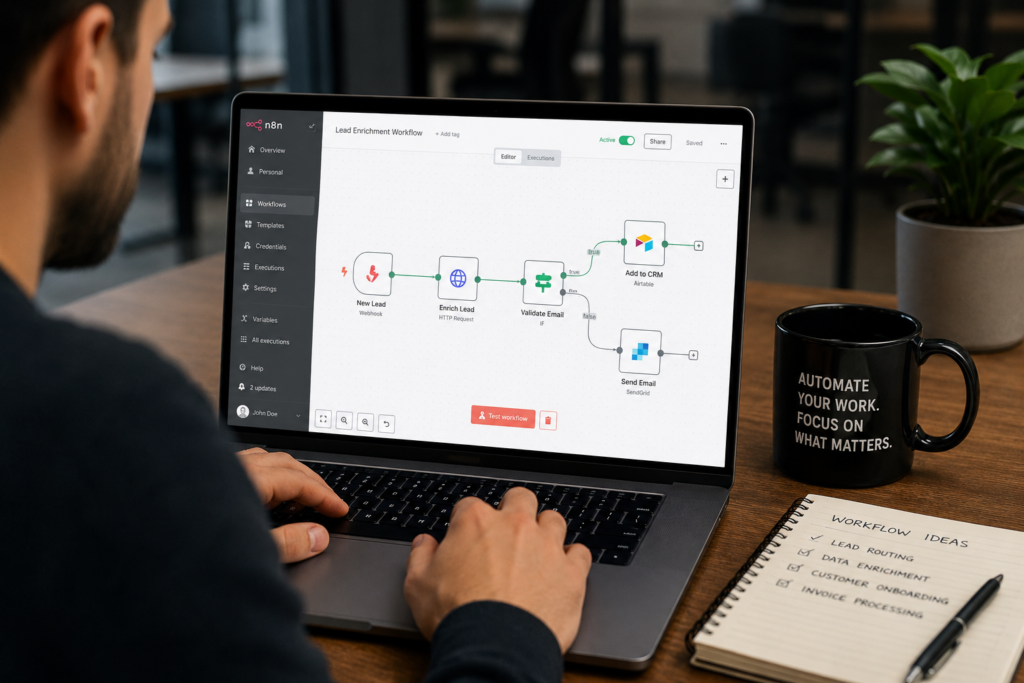
n8n — Best for Technical Teams Who Want Full Control
If you can read a JSON object without panicking, n8n is probably the most powerful tool in this space.
Why It Stands Out
It’s open source. Self-hostable. It handles complex branching logic better than almost anything else at this price point. You can run custom JavaScript inside your workflows. And you can keep your data entirely on your own infrastructure.
That last part matters a lot for companies dealing with sensitive data.
Where It Falls Short
The interface takes getting used to. It’s not as polished as some competitors. If you’re non-technical, the learning curve is real. Setup takes time — this is not a weekend project for complex workflows.
Best for: Developers, technical teams, anyone who needs self-hosting Pricing: Free self-hosted, cloud plans from ~$20/month
Make — Best for Visual Workflow Builders
Make has the best visual interface in the category. You can watch your workflow run in real time. You can see data flow through each step. That makes debugging much faster than tools where everything happens invisibly.
Why It Stands Out
The integration library is huge. The builder is intuitive enough for non-technical people. You can build real automations without any hand-holding. Pricing is reasonable for moderate usage.
Where It Falls Short
Complex logic is where Make starts to struggle. If your workflow needs heavy conditional branching or a lot of data transformation — you’ll feel the limits. It’s built for clarity, which sometimes means trading power.
Best for: Operations teams, marketers, non-technical builders Pricing: Free tier available, paid from ~$9/month
Zapier — The Safe Choice Nobody Loves
Zapier is what everyone uses when they need something to work without thinking too hard.
Why It Stands Out
Over 6,000 app integrations. Setup is genuinely simple. If you need a basic trigger-action automation running in twenty minutes — Zapier does it. It’s also the most familiar tool in this space, which means your team probably already knows it.
Where It Falls Short
It’s expensive relative to what you get. Logic capabilities are limited compared to n8n or Make. Multi-step Zaps get messy fast. And it’s become the default recommendation for people who haven’t looked at the alternatives recently — the alternatives have improved a lot.
Not bad. Just not the best value anymore.
Best for: Simple automations, non-technical users, teams already using it. Pricing: Free tier very limited; paid from ~$20/month
Activepieces — The Underdog Worth Watching
Most people haven’t heard of Activepieces. That’s starting to change.
Why It Stands Out
It’s open source. Clean interface. Adding integrations fast. The self-hosting option is genuinely good — better documented than n8n for first-time self-hosters. The community is active. The development pace is fast. And the pricing is hard to argue with.
Where It Falls Short
It’s not as mature as the others. Some integrations are rougher around the edges. A few edge cases aren’t fully handled yet.
But the trajectory is strong. If you’re evaluating tools right now and haven’t looked at Activepieces — you should.
Best for: Teams wanting n8n-level control with a gentler learning curve Pricing: Free self-hosted, cloud plans competitive
Pipedream — Best for Developers Building API Integrations
Pipedream sits in a slightly different lane. It’s built for developers who need to connect APIs quickly — without building a full backend.
Why It Stands Out
The workflow builder is code-first. You write Node.js or Python steps. Workflows are version-controlled via GitHub. The event-driven architecture is powerful for technical use cases. The free tier is generous.
Where It Falls Short
This is not for non-technical users. Full stop. If you’re not comfortable writing code, look elsewhere.
Best for: Developers, API integrations, technical automation Pricing: Free tier generous, paid from ~$19/month
How They Compare
| Tool | Best For | Technical Level | Self-Host |
| n8n | Complex workflows, full control | High | YES |
| Make | Visual building, ops teams | Low–Medium | NO |
| Zapier | Simple automations, wide integrations | Low | NO |
| Activepieces | Control without n8n complexity | Medium | Yes |
| Pipedream | API integrations, developer workflows | High | NO |
What Most Reviews Get Wrong
The “best workflow automation tool” question has no universal answer.
It has a “best for your situation” answer.
Non-technical marketer automating lead routing? Make or Zapier. Developer building something complex with sensitive data? n8n or Pipedream. Somewhere in between and want to avoid vendor lock-in? Look hard at Activepieces.
The mistake is picking the tool with the most integrations or the highest rating — without asking whether it fits how your team actually works.
A powerful tool your team won’t use is worse than a simpler one they will.
The best workflow automation tools in 2026 are genuinely good. Better than two years ago across the board.
The gap between the top options has narrowed. So the decision comes down less to “which one works”—and more to “which one fits.”
Figure out your team’s technical level, your data requirements, and your budget. Then pick the one that fits those constraints.
Not the one that sounds most impressive in a comparison article. Including this one.