Best AI Video Editing Tools in 2026: What’s Actually Worth Using
The AI video editing space has matured fast.
A year ago the question was “does AI video editing actually work?” In 2026 the question is “which tool fits my specific workflow?” — because most of them work, they just work differently for different use cases.
<cite index=”19-1″>The best AI video editing tools of 2026 have shifted from “AI-assisted editing” to “AI-driven editing.”</cite> The distinction matters. AI-assisted means you’re still doing the editing and AI helps with specific tasks. AI-driven means you’re reviewing and directing while AI handles the mechanical work.
Both models exist. Which one you want depends on what you’re making.
Futurelume — where technology gets practical
Before the List: Match the Tool to the Job
The single mistake that produces bad AI video editing experiences: buying a tool for the wrong job.
<cite index=”20-1″>The honest answer to “which AI video editor is best” is almost always “it depends on what you’re starting with and what you’re trying to end up with.”</cite>
Someone with two hours of raw podcast footage is solving a different problem than someone clipping highlight reels from a long-form interview, which is different from a marketing team needing social-ready product videos. Each has a different right answer.
The sections below are organized by use case.
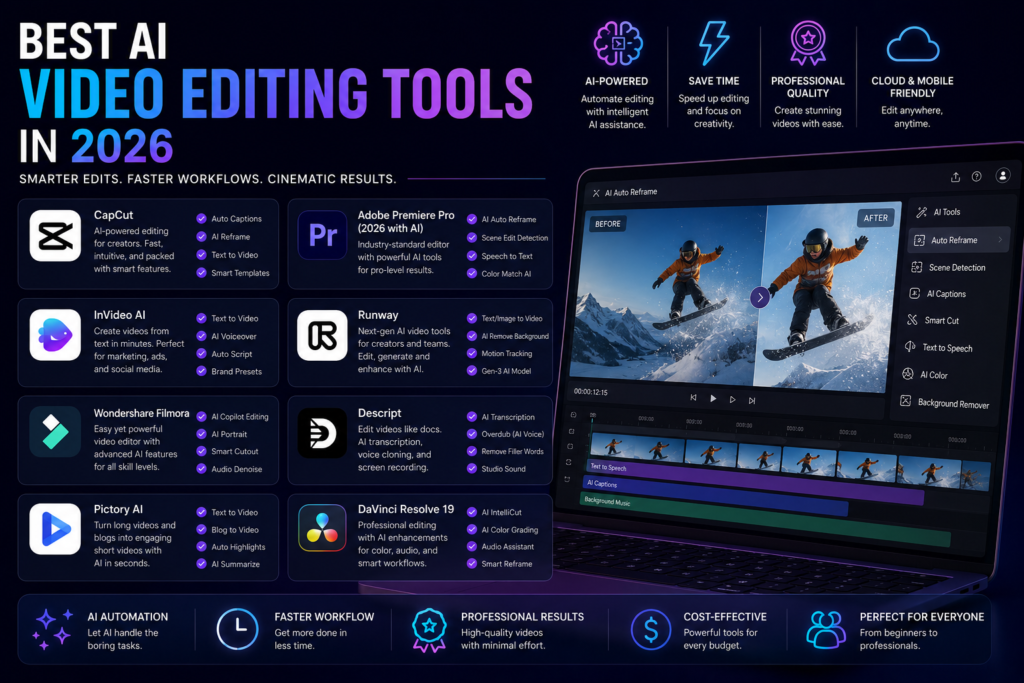
For Podcasts and Long-Form Interview Content: Descript
Descript pioneered transcript-based editing and remains the strongest tool for anyone producing podcasts, interviews, tutorials, or long-form YouTube content.
The core mechanic: <cite index=”20-1″>delete a sentence from the transcript, and the corresponding audio and video disappear with it.</cite> For talk-heavy content, this makes editing as fast as editing a document rather than scrubbing a timeline.
What it does best: Studio Sound cleans up recording imperfections convincingly. <cite index=”16-1″>Filler removal is handled with contextual awareness rather than deleting words blindly.</cite> Eye contact correction and voice cloning go further than most competitors attempt.
Pricing: <cite index=”20-1″>Free (roughly 60 minutes/month, watermarked), Hobbyist ($16-24/month), Creator ($24-35/month — the realistic baseline for regular use), Business (~$50-65/month).</cite>
The honest caveat: <cite index=”20-1″>Descript shifted from a simple transcription-hours model to a combination of media minutes and AI credits — heavy recorders or heavy AI feature users can burn through an allowance faster than the sticker price suggests.</cite> Budget based on actual usage, not the headline price.
Best for: Podcasters, YouTube creators, anyone editing talk-heavy content. One real user reports it saves 10+ hours per month at $16/month — the ROI math is clear.
For Short-Form Social Content: CapCut
CapCut is the most-used AI video editor for short-form content — and it’s free for most users.
Auto-captions, auto-reframe for different aspect ratios, background removal, speed adjustment, and template-based editing for TikTok, Instagram Reels, and YouTube Shorts. The AI handles the mechanical formatting work while you focus on the content.
<cite index=”19-1″>CapCut is free (Pro: $7.99/month).</cite> For the feature set available, it’s the best value in the category.
The honest caveat: <cite index=”19-1″>OpusClip’s auto-reframe isn’t perfect on wide shots, so always review before posting.</cite> CapCut has the same limitation — AI reframing works well on center-weighted footage and needs manual review on anything more complex.
Best for: Social media creators, short-form content, TikTok and Reels workflows.
For Professional Narrative Editing: Adobe Premiere Pro
<cite index=”14-1″>Adobe Premiere Pro with its latest AI-powered updates remains the most feature-rich choice for professional narrative editing, backed by PCMag and Adobe’s own updates.</cite>
<cite index=”14-1″>Adobe’s January 2026 announcement of “new AI-powered video editing tools in Premiere, plus major motion design upgrades in After Effects” underscores the industry’s commitment to embedding intelligence directly into the editing timeline.</cite>
What’s new in 2026: AI scene detection, Harmonize for color matching across clips, Generative Extend for seamlessly lengthening clips, and Remix for audio that adapts to timeline changes automatically.
<cite index=”16-1″>Adobe Premiere price: $19.99/month for the annual plan.</cite> <cite index=”16-1″>If you want AI to assist rather than replace your editing decisions, Premiere remains one of the strongest tools in 2026.</cite>
Best for: Professional editors, narrative film and TV, complex multi-camera productions.
For Color Grading and Professional Post: DaVinci Resolve
DaVinci Resolve is the professional standard for color grading, and the AI tools in the 2026 version extend into noise reduction, scene cut detection, and automated audio cleanup.
<cite index=”16-1″>DaVinci Resolve Studio is available for a one-time payment of $295.</cite> The free version is genuinely capable — most independent creators never need the Studio upgrade.
Best for: Colorists, filmmakers who prioritize color accuracy, anyone who wants professional-grade tools without a subscription.
For Social Clipping and Repurposing: OpusClip and Submagic
These tools solve a specific problem: you have a long video and you need short clips for social media.
OpusClip analyzes your video for the most engaging moments, clips them, adds captions, and formats them for social. The AI hook scoring surfaces which moments are most likely to perform.
Submagic focuses on captions — stylized, animated captions that match the aesthetic of high-performing social content.
For content repurposing at scale, these tools recover hours that would otherwise go to manual clipping and captioning.
For AI-Generated Video Content: Runway and Sora
This is the category that’s moved fastest and still has the widest gap between demo and reliable production use.
Runway is the Swiss Army knife of AI video generation — text-to-video, image-to-video, video-to-video style transfer, and more. <cite index=”17-1″>Its most affordable plan is $15/month for 625 credits.</cite>
Sora (OpenAI) produces higher-quality video generation outputs but is more expensive and still in limited access for production volumes.
The honest assessment: For marketing B-roll, concept visualization, and social content where realistic video generation is useful but not critical — Runway is worth exploring. For anything requiring consistent, production-quality AI video — the gap between demo and reliable use is still real.
For Browser-Based Editing Without Software Installation: VEED
<cite index=”16-1″>If you want a browser-based tool that quickly generates subtitles, simplifies trimming, and adapts videos to social formats without touching professional editing software, VEED is practical.</cite>
Quick subtitles, basic cuts, format conversion, social resizing — all in the browser without downloading anything. Not a replacement for a professional editor. A practical option for teams that need fast, good-enough results without technical overhead.
Pricing: Free plan available. <cite index=”15-1″>Paid Pro plan starts at $16/month.</cite>
The Comparison Table
| Tool | Best For | Price | Standout AI Feature |
|---|---|---|---|
| Descript | Podcasts, long-form interviews | $16-35/mo | Transcript-based editing |
| CapCut | Short-form social content | Free / $7.99/mo | Auto-captions, auto-reframe |
| Adobe Premiere | Professional narrative editing | $19.99/mo | Generative Extend, Harmonize |
| DaVinci Resolve | Color grading, professional post | Free / $295 one-time | AI color tools, noise reduction |
| OpusClip | Long-to-short content clipping | Subscription | AI hook scoring, auto-clip |
| Runway | AI video generation, B-roll | $15/mo+ | Text-to-video, style transfer |
| VEED | Quick browser-based editing | Free / $16/mo | Auto-subtitles, format conversion |
| Filmora | Beginners, all-in-one editing | $49.99/year | Scene detection, smart transitions |
The Real Budget Stack for Independent Creators
One creator’s actual monthly spend in 2026, broken down honestly:
<cite index=”19-1″>CapCut is free (Pro: $7.99/month — don’t pay for it). Descript is $16/month (Hobbyist) — biggest expense, but saves 10+ hours per month. LumeFlow AI is $9.16/month annual — cheaper than stock footage subscriptions. DaVinci Resolve is free (Studio: $295 one-time).</cite>
Total for a complete professional stack: $25-40/month. That’s the realistic number for a creator who produces regularly and wants quality results without overpaying.
The best AI video editing tool in 2026 is the one that fits what you’re actually making. Podcast editors should be in Descript. Social creators should start with CapCut. Professional editors stay in Premiere or move to DaVinci. Anyone who hasn’t tested what’s available in the last six months is probably leaving time on the table.
The free tiers are good enough to evaluate before committing. Start there.